A speech engine that is not tied to one model
vox runs Qwen3-TTS, F5-TTS, Kokoro-82M and CosyVoice2 from a single .tmod file: on the CPU, on a GPU through Vulkan and right in the browser through WebGPU. One seed, one sound.
- Use it as a library (C ABI), a CLI, a Python package or a single
vox.jsscript - On the test model, F5-TTS differs from the official
f5_ttsby less than 1e-6 of the signal amplitude - The noise does not depend on the thread count, the GPU or the chunk size
A model is a file, the engine is always the same
Weights live in one .tmod, a voice in a .tvoice. A new model plugs in as a “family” on top of the same runtime, so the resource planner, streaming and tests are shared.
Resources under control
Device choice, RAM and VRAM limits, thread count and run mode. You can see the placement plan without loading anything: vox plan.
Seamless streaming
Text goes in piece by piece and audio comes out as it is ready. F5-TTS chunks are joined with a 0.15 s crossfade, as in the official inference.
Checked against a reference
Every family is compared with the official package on a test model with random weights. What is not verified is stated in the README and further down this page.
Which models already work
One engine, different families. More models are added one per iteration, each with its own tests.
| Model | CPU | Vulkan | Browser (WebGPU) | What is verified |
|---|---|---|---|---|
| Qwen3-TTS 12HzBase, CustomVoice, VoiceDesign; 0.6B and 1.7B | yes | yes | yes | The core is compared with the official qwen_tts, including on a real 1.7B Base; RTX 3050 timings are in the README. In the browser: loading from an HF link and synthesis are compared with the core on a tiny model; real weights and a real GPU have not been measured. Base voice cloning from a recording runs in the browser (compared with the core on a tiny model) |
| F5-TTSDiT + flow matching + Vocos, cloning from a sample | yes | yes, whole graph | yes | Compared with f5_tts and vocos on a test model, in the browser too; the Vulkan graph (DiT and Vocos) too, to 4e-9 on lavapipe.. On real weights (hotstone228/F5-TTS-Russian, 4 steps) RTF 0.76 on an RTX 5050, 1.39 on an RTX 3050 |
| Kokoro-82MStyleTTS2 + iSTFTNet; named voices and blends; English G2P built in | yes | not yet | not yet | Every stage is compared with the official kokoro to ~1e-6; end-to-end audio has the same length and a log-mel difference of 0.16–0.71 dB. The built-in G2P matches misaki on 92% of words; with the Python misaki the pieces are exactly those of KPipeline. On real Kokoro-82M weights: the same length as the official, mean |Δ log-mel| 0.125, whisper hears the same words |
| CosyVoice2-0.5BQwen2 LM over speech tokens + flow matching + HiFT; cloning, instructions, laughter / breath tags | yes | LLM + flow (0.18) | not yet | Every stage (mel, fbank, CAM++, Whisper mel, S3 tokens, LLM log-probs, flow, HiFT) matches the official CosyVoice code to 1e-7–1e-4 on a tiny model; whole utterances through the engine to 1.4e-5; text pieces identical to text_normalize. Real weights checked by the author: ASR verbatim (en, zh) |
| ChatterboxLlama T3 over speech tokens + S3Gen (flow matching + HiFT); English; cloning without a transcript, emotion exaggeration | yes | T3 + flow (0.18) | not yet | Every stage (VoiceEncoder, T3 conditioning, CFG logits of every step, flow, HiFT) matches the official chatterbox-tts to 1e-7–6e-5 on a tiny model; whole utterances through the engine to 1.3e-5 with four sets of options. Real weights checked by the author: ASR verbatim |
| XTTS, Chatterbox Multilingual | queued | To be added one model per iteration | ||
From text to sound
All clients go through the same contract. Only the place where the model runs differs.
Converter
Hugging Face weights become a .tmod: f32, f16, bf16, q8 or q4.
python -m vox buildpython -m vox.build_f5python -m vox.build_kokoro
Family
Describes the model stages and knows how to clone a voice. Autoregressive models go through codecs, the rest through the “direct” mode.
Device
The planner places the stages on the hardware.
- CPU: AVX2, aarch64
- Vulkan: NVIDIA, AMD, Intel
- WebGPU: browser (
vox.js)
Client
Audio is float32, mono. Take it in one piece or as a stream.
- C ABI, C++, Rust, Go
- Python, Node.js
- HTTP server, browser
How each model runs
Each family is a chain of native stages. Every stage is compared with the official PyTorch code on a tiny model built from the official classes.
Performance
Measured by a user on vox 0.14.0 with tools/run_full_check.py: 16-thread CPU, RTX 3050 6 GB and RTX 5050 8 GB. qwentts.cpp ran on the same machine with the same text; WER was 0 for every variant.
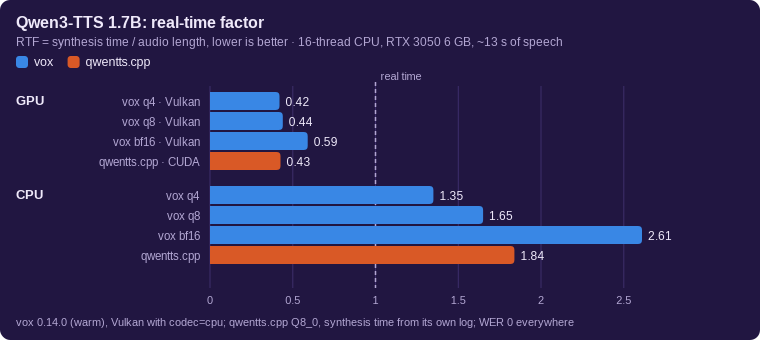
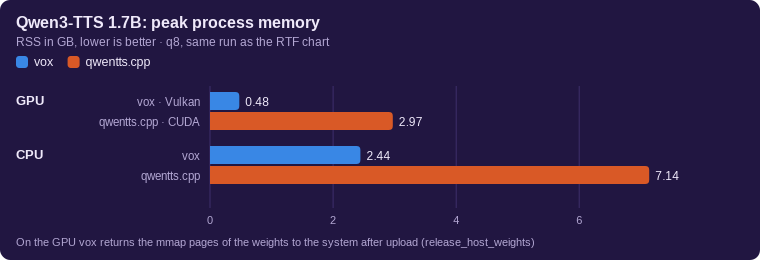
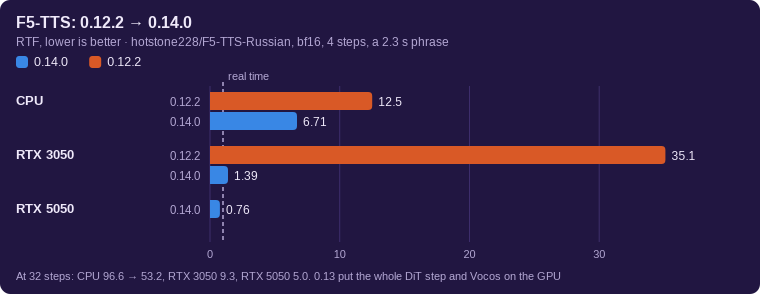
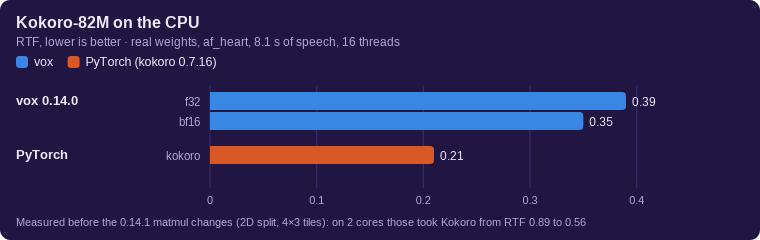
0.14.1 speeds up CPU matrix products with many rows, with bit-identical audio: on 2 cores Kokoro went from RTF 0.89 to 0.56. It also adds a faster GPU GEMM and attention for F5; those have only been checked for correctness on a software GPU so far. Run tools/run_full_check.py on your machine to get your numbers.
How to get it
Repository: github.com/dariumi/Vox. License: Apache-2.0. Model weights are not part of the repository: each model has its own license.
Build from source
git clone https://github.com/dariumi/Vox.git
cd Vox
cmake -S . -B build -DVOX_NATIVE=ON
cmake --build build -j
This produces build/vox (the CLI) and build/libvox.so (the library; .dylib and .dll on macOS and Windows). Vulkan turns on by itself if the headers are found.
Python package
pip install vox-tts
Wheels for Linux, Windows and macOS (Vulkan included on Linux and Windows) from PyPI; for Vulkan or other platforms, pip install . in the repository builds the native module (CMake and a compiler are required). Then: import vox. Server: python -m vox serve.
For the browser: one file
<script src="vox.js"></script>
No build step, no dependencies, about 300 KB. Best with WebGPU (otherwise the CPU does the work, several times slower): Chrome and Edge 113+ (Windows, macOS; on Linux WebGPU still needs flags), Firefox 141+ (Windows), Safari 26. The page must be served over HTTPS or from localhost.
The .tmod model file
# Qwen3-TTS
python -m vox build --model ./Qwen3-TTS-12Hz-1.7B-Base \
    --dtype bf16 --quant q8 -o model.q8.tmod

# F5-TTS
python -m vox.build_f5 --ckpt model_1250000.safetensors \
    --vocab vocab.txt --vocos ./vocos-mel-24khz \
    --dtype bf16 -o f5.bf16.tmod
For the browser use bf16 or q8: an F5 file in f32 is over 1 GB.
Using it from different languages
All bindings go through the C ABI. The examples in the repository are checked automatically: on the test model each one produces exactly the same samples as vox say with the same seed.
# a voice from a recording (best: 24 kHz WAV, 5-15 seconds of clean speech)
vox voice create ref.wav --model model.tmod --text "The text spoken in the recording" -o me.tvoice

# synthesize to a file
vox say "Hello! This is a check." --model model.tmod --voice me.tvoice -o out.wav

# stream into a player
vox say --stdin --stream --model model.tmod --voice me.tvoice | ffplay -f f32le -ar 24000 -i -

# F5-TTS: the parameters are named as in the official code
vox say "Hello!" --model f5.tmod --voice me.tvoice --nfe 16 --cfg 2 --sway -1 --speed 1 -o out.wav

# Kokoro-82M: a named voice or a blend, no recording needed
vox say "Hello!" --model kokoro.tmod --speaker af_heart,bf_emma -o out.wav
vox phonemize --model kokoro.tmod "It's 10 o'clock."vox devices, vox plan --model model.tmod.import vox
eng = vox.Engine("model.tmod", device="auto") # "cpu", "vulkan:0", "auto"
voice = eng.clone_voice("ref.wav", "The text spoken in the recording", name="me", seed=42)
voice.save("me.tvoice")
audio = eng.synthesize("Hello!", voice, seed=42) # numpy float32, mono, eng.sample_rate
# text arrives in pieces, audio is taken as it becomes ready
with eng.session(voice, seed=42) as s:
s.feed("The first sentence. ")
chunks = list(s.ready())
s.end()
chunks += list(s)pip install . from the repository root. Errors are vox.VoxError, running out of memory is vox.OutOfMemory./* Minimal C ABI example in plain C: synthesize a phrase to raw float32 PCM.
* cc examples/minimal.c -Iinclude -Lbuild -lvox -o minimal
* ./minimal model.tmod voice.tvoice "Hello!" > out.f32
*/
#include <stdio.h>
#include "vox.h"
#define CHECK(x) do { vox_status s_ = (x); if (s_ < 0) { fprintf(stderr, "%s: %s\n", #x, vox_last_error()); return 1; } } while (0)
int main(int argc, char **argv) {
if (argc < 4) { fprintf(stderr, "usage: %s model.tmod voice.tvoice text\n", argv[0]); return 1; }
vox_engine *e; vox_voice *v; vox_session *s;
CHECK(vox_engine_open(argv[1], NULL, &e));
CHECK(vox_voice_load(e, argv[2], &v));
vox_gen_params p;
vox_gen_params_default(&p);
p.seed = 42;
CHECK(vox_session_create(e, v, &p, &s));
CHECK(vox_session_feed_text(s, argv[3]));
CHECK(vox_session_end_text(s));
float buf[4096];
size_t n, total = 0;
vox_status st;
while ((st = vox_session_pull(s, buf, 4096, &n)) == VOX_OK) {
fwrite(buf, sizeof(float), n, stdout);
total += n;
}
CHECK(st);
fprintf(stderr, "%zu samples @ %u Hz\n", total, vox_engine_sample_rate(e));
vox_session_free(s);
vox_voice_free(v);
vox_engine_close(e);
return 0;
}cc examples/minimal.c -Iinclude -Lbuild -lvox -o minimal. The contract is include/vox.h.// C++ over the C ABI: RAII wrappers and synthesis to stdout (raw float32 PCM, mono).
// c++ -std=c++17 examples/minimal.cpp -Iinclude -Lbuild -lvox -o minimal_cpp
// LD_LIBRARY_PATH=build ./minimal_cpp model.tmod voice.tvoice "Hello!" > out.f32
#include <cstdio>
#include <memory>
#include <stdexcept>
#include <string>
#include <vector>
#include "vox.h"
static void check(vox_status s, const char *what) {
if (s < 0) throw std::runtime_error(std::string(what) + ": " + vox_last_error());
}
template <class T, void (*F)(T *)> struct Deleter { void operator()(T *p) const { F(p); } };
using Engine = std::unique_ptr<vox_engine, Deleter<vox_engine, vox_engine_close>>;
using Voice = std::unique_ptr<vox_voice, Deleter<vox_voice, vox_voice_free>>;
using Session = std::unique_ptr<vox_session, Deleter<vox_session, vox_session_free>>;
int main(int argc, char **argv) {
if (argc < 4) { std::fprintf(stderr, "usage: %s model.tmod voice.tvoice text\n", argv[0]); return 1; }
try {
vox_engine *e = nullptr;
check(vox_engine_open(argv[1], nullptr, &e), "open");
Engine engine(e);
vox_voice *v = nullptr;
check(vox_voice_load(e, argv[2], &v), "voice");
Voice voice(v);
vox_gen_params p;
vox_gen_params_default(&p);
p.seed = 42;
vox_session *s = nullptr;
check(vox_session_create(e, v, &p, &s), "session");
Session session(s);
check(vox_session_feed_text(s, argv[3]), "feed");
check(vox_session_end_text(s), "end");
std::vector<float> buf(4096);
size_t n = 0, total = 0;
vox_status st;
while ((st = vox_session_pull(s, buf.data(), buf.size(), &n)) == VOX_OK) {
std::fwrite(buf.data(), sizeof(float), n, stdout);
total += n;
}
check(st, "pull");
std::fprintf(stderr, "%zu samples @ %u Hz\n", total, vox_engine_sample_rate(e));
} catch (const std::exception &ex) {
std::fprintf(stderr, "%s\n", ex.what());
return 1;
}
return 0;
}//! Rust over the C ABI (no dependencies): synthesis to stdout as raw float32 PCM.
//! cd examples/rust && cargo build --release && LD_LIBRARY_PATH=../../build ./target/release/vox-example model.tmod voice.tvoice "Hello!" > out.f32
use std::ffi::{c_char, c_void, CStr, CString};
use std::io::Write;
use std::ptr;
#[repr(C)]
struct GenParams {
struct_size: u32,
temperature: f32,
top_p: f32,
repetition_penalty: f32,
top_k: i32,
sub_temperature: f32,
sub_top_p: f32,
sub_top_k: i32,
seed: u64,
chunk_frames: u32,
max_frames: u32,
language: *const c_char,
decoder_context_frames: u32,
decoder_mode: u32,
extra_json: *const c_char,
}
const VOX_OK: i32 = 0;
extern "C" {
fn vox_last_error() -> *const c_char;
fn vox_gen_params_default(p: *mut GenParams);
fn vox_engine_open(path: *const c_char, opts: *const c_void, out: *mut *mut c_void) -> i32;
fn vox_engine_close(e: *mut c_void);
fn vox_engine_sample_rate(e: *const c_void) -> u32;
fn vox_voice_load(e: *mut c_void, path: *const c_char, out: *mut *mut c_void) -> i32;
fn vox_voice_free(v: *mut c_void);
fn vox_session_create(e: *mut c_void, v: *const c_void, p: *const GenParams, out: *mut *mut c_void) -> i32;
fn vox_session_feed_text(s: *mut c_void, utf8: *const c_char) -> i32;
fn vox_session_end_text(s: *mut c_void) -> i32;
fn vox_session_pull(s: *mut c_void, pcm: *mut f32, cap: usize, written: *mut usize) -> i32;
fn vox_session_free(s: *mut c_void);
}
fn check(status: i32, what: &str) -> Result<(), String> {
if status < 0 {
let msg = unsafe { CStr::from_ptr(vox_last_error()) }.to_string_lossy().into_owned();
return Err(format!("{what}: {msg}"));
}
Ok(())
}
fn run() -> Result<(), String> {
let args: Vec<String> = std::env::args().collect();
if args.len() < 4 {
return Err(format!("usage: {} model.tmod voice.tvoice text", args[0]));
}
let (model, voice_path, text) = (CString::new(args[1].as_str()).unwrap(), CString::new(args[2].as_str()).unwrap(), CString::new(args[3].as_str()).unwrap());
unsafe {
let (mut e, mut v, mut s) = (ptr::null_mut(), ptr::null_mut(), ptr::null_mut());
check(vox_engine_open(model.as_ptr(), ptr::null(), &mut e), "open")?;
check(vox_voice_load(e, voice_path.as_ptr(), &mut v), "voice")?;
let mut p: GenParams = std::mem::zeroed();
vox_gen_params_default(&mut p);
p.seed = 42;
check(vox_session_create(e, v, &p, &mut s), "session")?;
check(vox_session_feed_text(s, text.as_ptr()), "feed")?;
check(vox_session_end_text(s), "end")?;
let mut buf = vec![0f32; 4096];
let (mut total, mut out) = (0usize, std::io::stdout().lock());
loop {
let mut n = 0usize;
let st = vox_session_pull(s, buf.as_mut_ptr(), buf.len(), &mut n);
if st != VOX_OK {
check(st, "pull")?;
break; // VOX_DONE (2) or VOX_AGAIN (1) in synchronous mode means the end here
}
let bytes = std::slice::from_raw_parts(buf.as_ptr() as *const u8, n * 4);
out.write_all(bytes).map_err(|e| e.to_string())?;
total += n;
}
eprintln!("{total} samples @ {} Hz", vox_engine_sample_rate(e));
vox_session_free(s);
vox_voice_free(v);
vox_engine_close(e);
}
Ok(())
}
fn main() {
if let Err(e) = run() {
eprintln!("{e}");
std::process::exit(1);
}
}VOX_LIB_DIR to the library path at build time and LD_LIBRARY_PATH at run time.// Go via cgo (C ABI): synthesis to stdout as raw float32 PCM.
//
// cd examples/go && go build -o vox-go . && LD_LIBRARY_PATH=../../build ./vox-go model.tmod voice.tvoice "Hello!" > out.f32
package main
/*
#cgo CFLAGS: -I../../include
#cgo LDFLAGS: -L../../build -lvox
#include <stdlib.h>
#include "vox.h"
*/
import "C"
import (
"fmt"
"os"
"unsafe"
)
func check(st C.vox_status, what string) {
if st < 0 {
fmt.Fprintf(os.Stderr, "%s: %s\n", what, C.GoString(C.vox_last_error()))
os.Exit(1)
}
}
func main() {
if len(os.Args) < 4 {
fmt.Fprintf(os.Stderr, "usage: %s model.tmod voice.tvoice text\n", os.Args[0])
os.Exit(1)
}
model, voicePath, text := C.CString(os.Args[1]), C.CString(os.Args[2]), C.CString(os.Args[3])
defer C.free(unsafe.Pointer(model))
defer C.free(unsafe.Pointer(voicePath))
defer C.free(unsafe.Pointer(text))
var e *C.vox_engine
var v *C.vox_voice
var s *C.vox_session
check(C.vox_engine_open(model, nil, &e), "open")
defer C.vox_engine_close(e)
check(C.vox_voice_load(e, voicePath, &v), "voice")
defer C.vox_voice_free(v)
var p C.vox_gen_params
C.vox_gen_params_default(&p)
p.seed = 42
check(C.vox_session_create(e, v, &p, &s), "session")
defer C.vox_session_free(s)
check(C.vox_session_feed_text(s, text), "feed")
check(C.vox_session_end_text(s), "end")
buf := make([]float32, 4096)
total := 0
for {
var n C.size_t
st := C.vox_session_pull(s, (*C.float)(unsafe.Pointer(&buf[0])), C.size_t(len(buf)), &n)
if st != C.VOX_OK {
check(st, "pull")
break
}
os.Stdout.Write(unsafe.Slice((*byte)(unsafe.Pointer(&buf[0])), int(n)*4))
total += int(n)
}
fmt.Fprintf(os.Stderr, "%d samples @ %d Hz\n", total, uint32(C.vox_engine_sample_rate(e)))
}// Node.js via koffi (FFI to the C ABI): synthesis to stdout as raw float32 PCM.
// cd examples/node && npm install && node vox.mjs model.tmod voice.tvoice "Hello!" > out.f32
// Library path: VOX_LIB (default ../../build/libvox.so; macOS: libvox.dylib, Windows: vox.dll).
import koffi from "koffi";
const lib = koffi.load(process.env.VOX_LIB || new URL("../../build/libvox.so", import.meta.url).pathname);
const vox_last_error = lib.func("const char *vox_last_error()");
const vox_gen_params_default = lib.func("void vox_gen_params_default(void *p)");
const vox_engine_open = lib.func("int vox_engine_open(const char *path, void *opts, _Out_ void **out)");
const vox_engine_close = lib.func("void vox_engine_close(void *e)");
const vox_engine_sample_rate = lib.func("uint32_t vox_engine_sample_rate(void *e)");
const vox_voice_load = lib.func("int vox_voice_load(void *e, const char *path, _Out_ void **out)");
const vox_voice_free = lib.func("void vox_voice_free(void *v)");
const vox_session_create = lib.func("int vox_session_create(void *e, void *v, void *p, _Out_ void **out)");
const vox_session_feed_text = lib.func("int vox_session_feed_text(void *s, const char *utf8)");
const vox_session_end_text = lib.func("int vox_session_end_text(void *s)");
const vox_session_pull = lib.func("int vox_session_pull(void *s, float *pcm, size_t cap, _Out_ size_t *written)");
const vox_session_free = lib.func("void vox_session_free(void *s)");
const check = (st, what) => { if (st < 0) throw new Error(`${what}: ${vox_last_error()}`); };
const [model, voicePath, text] = process.argv.slice(2);
if (!text) { console.error("usage: node vox.mjs model.tmod voice.tvoice text"); process.exit(1); }
const out = [null], voice = [null], sess = [null];
check(vox_engine_open(model, null, out), "open");
const engine = out[0];
check(vox_voice_load(engine, voicePath, voice), "voice");
// vox_gen_params: vox_gen_params_default fills struct_size; seed is a uint64 at offset 32
const params = Buffer.alloc(72);
vox_gen_params_default(params);
params.writeBigUInt64LE(42n, 32);
check(vox_session_create(engine, voice[0], params, sess), "session");
check(vox_session_feed_text(sess[0], text), "feed");
check(vox_session_end_text(sess[0]), "end");
const buf = new Float32Array(4096), written = [0n];
let total = 0;
for (;;) {
const st = vox_session_pull(sess[0], buf, buf.length, written);
if (st !== 0) { check(st, "pull"); break; }
const n = Number(written[0]);
// a copy: writes to a pipe are asynchronous, and buf is refilled by the next pull
process.stdout.write(Buffer.from(buf.slice(0, n).buffer));
total += n;
}
console.error(`${total} samples @ ${vox_engine_sample_rate(engine)} Hz`);
vox_session_free(sess[0]); vox_voice_free(voice[0]); vox_engine_close(engine);koffi FFI library (npm install in the example folder)."""Plain ctypes over the C ABI (no vox package needed): synthesis to stdout as raw float32 PCM.
python examples/python/ctypes_example.py model.tmod voice.tvoice "Hello!" > out.f32
Library path: VOX_LIB (default build/libvox.so; macOS: libvox.dylib, Windows: vox.dll).
The ready-made package is usually more convenient: `import vox; vox.Engine(...)` (see the README)."""
import ctypes as C
import os
import struct
import sys
here = os.path.dirname(os.path.abspath(__file__))
lib = C.CDLL(os.environ.get("VOX_LIB") or os.path.join(here, "..", "..", "build", "libvox.so"))
lib.vox_last_error.restype = C.c_char_p
lib.vox_engine_sample_rate.restype = C.c_uint32
lib.vox_engine_sample_rate.argtypes = [C.c_void_p]
for name in ("vox_engine_close", "vox_voice_free", "vox_session_free"):
getattr(lib, name).argtypes = [C.c_void_p]
def check(st, what):
if st < 0:
raise RuntimeError(f"{what}: {lib.vox_last_error().decode()}")
return st
def main(model, voice_path, text):
e, v, s = C.c_void_p(), C.c_void_p(), C.c_void_p()
check(lib.vox_engine_open(model.encode(), None, C.byref(e)), "open")
check(lib.vox_voice_load(e, voice_path.encode(), C.byref(v)), "voice")
params = C.create_string_buffer(72) # vox_gen_params; vox_gen_params_default sets struct_size
lib.vox_gen_params_default(params)
struct.pack_into("<Q", params, 32, 42) # seed: uint64 at offset 32
check(lib.vox_session_create(e, v, params, C.byref(s)), "session")
check(lib.vox_session_feed_text(s, text.encode()), "feed")
check(lib.vox_session_end_text(s), "end")
buf = (C.c_float * 4096)()
n, total = C.c_size_t(), 0
while True:
st = lib.vox_session_pull(s, buf, 4096, C.byref(n))
if st != 0:
check(st, "pull")
break
sys.stdout.buffer.write(bytes(buf)[: n.value * 4])
total += n.value
print(f"{total} samples @ {lib.vox_engine_sample_rate(e)} Hz", file=sys.stderr)
lib.vox_session_free(s)
lib.vox_voice_free(v)
lib.vox_engine_close(e)
if __name__ == "__main__":
if len(sys.argv) < 4:
sys.exit("usage: ctypes_example.py model.tmod voice.tvoice text")
main(*sys.argv[1:4])ctypes over the same library.<script src="vox.js"></script>
<script type="module">
// 1. The model: a Hugging Face repo, a direct link, a .tmod, a File/Blob. A checkpoint (safetensors) is downloaded and
// converted in the browser; Qwen3-TTS is read tensor by tensor (HTTP Range) and never sits in memory as a whole.
// backend: "auto" (default) uses WebGPU and falls back to the CPU; load: "balanced" | "gentle" | "full" paces the GPU.
const model = await Vox.load("hf:Qwen/Qwen3-TTS-12Hz-0.6B-CustomVoice", {
dtype: "bf16", quant: "", // "q8" is four times smaller than f32
onProgress: (p) => console.log(Math.round(p * 100) + "%"), onStatus: console.log,
});
// F5-TTS the same way: Vox.load("hf:SWivid/F5-TTS") or Vox.load("https://.../model_1250000.safetensors", { vocab: "https://.../vocab.txt" })
// 2. The voice. F5-TTS and Qwen3-TTS Base: from a recording (File, Blob, URL or Float32Array + sampleRate) and its text.
// Qwen3-TTS CustomVoice/VoiceDesign: a ready speaker / voice description, or a .tvoice (vox voice create or voice.toTvoice())
const voice = model.family === "qwen3-tts" && !model.capabilities.clone_from_audio
? model.speakerVoice("aiden", "Speak slowly and calmly", { language: "english" })
: await model.cloneVoice(refFile, "The text spoken in the recording");
// 3. Synthesize in one piece or as a stream
const { pcm, sampleRate } = await model.synthesize("Hello, world!", { voice, seed: 1 });
Vox.play(pcm, sampleRate); // or Vox.wav(pcm, sampleRate) -> a Blob to download
// 4. Duplex streaming: text goes in on the fly, audio comes out on the fly
const player = new Vox.StreamPlayer(model.sampleRate);
const d = model.duplex({ voice, commit: "auto", idle_ms: 600 }); // auto | sentence | manual
input.addEventListener("input", () => d.setText(input.value)); // a text field; d.write(token from an LLM) works too
(async () => { for await (const piece of d.audio()) player.push(piece); })();
// d.flush() speaks what has accumulated now; d.end() means the text is finished; d.cancel() aborts
</script>d.caps shows how the model takes text). F5 parameters are named as in the official code: nfe_step, cfg_strength, sway_sampling_coef, speed. Cancel with signal (AbortSignal).python -m vox serve --model model.tmod --voices ./voices --port 8080 --device vulkan
curl localhost:8080/v1/voices
curl -X POST localhost:8080/v1/tts -d '{"text":"Hello!","voice":"me","seed":42}' | ffplay -i -
curl -X POST localhost:8080/v1/voices -d '{"name":"me","audio_b64":"<WAV in base64>","ref_text":"The recording text"}'wav, pcm16, f32.Demo: F5-TTS and Qwen3-TTS on WebGPU
Everything is computed in your browser: on the GPU (WebGPU), or on the CPU if there is none. Nothing is sent to a server: the model and the voice recording stay on the page.
Load a model to start.
Speed depends on the GPU and the number of steps. F5-TTS is heavy: on weak integrated GPUs choose “Fast”. The author has no measurements on real GPUs yet.
Live input: type and it speaks
Duplex streaming. Text goes in on the fly and audio comes out right away while the model keeps reading. Models differ: Qwen3-TTS reads word by word and starts speaking mid-sentence, F5-TTS speaks whole chunks (per sentence or after a typing pause). The engine picks how to feed the chosen model. You need a model loaded above and a voice.
Input stopped
Load a model and choose a voice, then press “Start”.
manual mode collects everything you type into one recording: press “Finish” and wait for the audio. Text that has already been spoken is not re-spoken after an edit.